

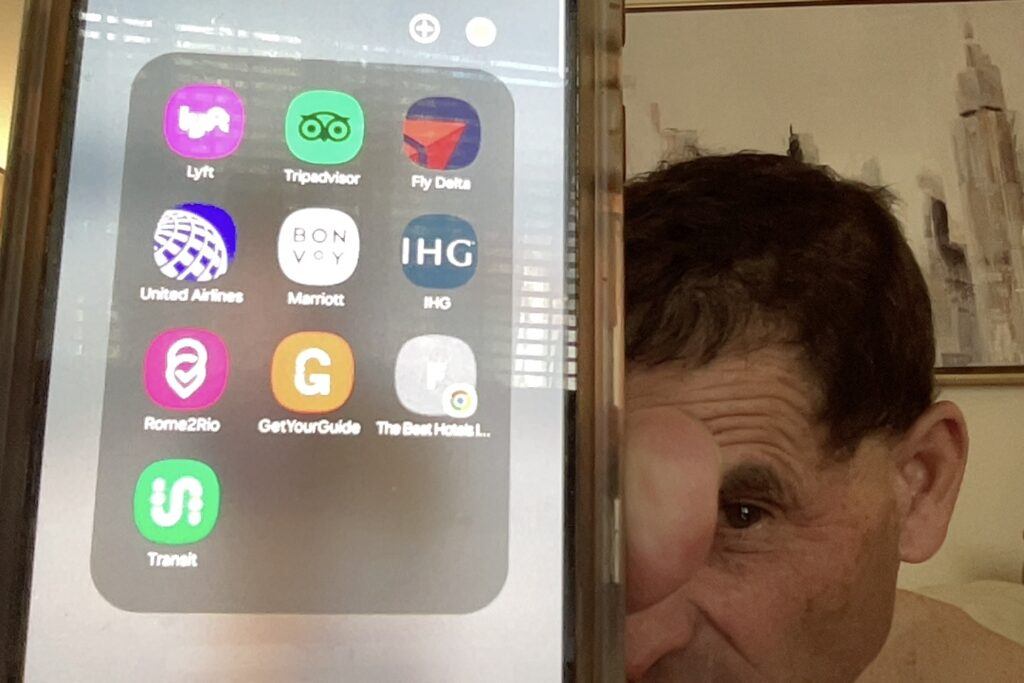
HERE ARE SOME PHOTOS OF MY TRAVEL APP FIELD ON MY CELL PHONE. THESE ARE MY 10 FAVORITE TRAVEL APPS:
Photo 1). The original travel app field that I used for about a year.
Photo 2). My travel app field after a year of travel planning with smartphones.
Photo 3).Finally, my travel app field today.

These are the only travel apps I use on a regular basis. I also use Google Maps and Google search but those platforms are default apps that do not have to be downloaded on my devices.
As you will see, I am always updating my app field and, if you scroll down to the end of the FAQ section, you will find further updates from travel news announcements.
The first two photos include what my app field included for at least two years. Then I discovered the Best Hotels app and the Transit app. The Best Hotels app is fun to study and the Transit app is the best bus schedule and locator I have ever used. Transit App does show subways as well as buses and it does exist in many major cities of USA, Canada, Australia, and Europe.
The Best Hotels App is actually a list of the best hotels in Paris France. It is my dream vacation app for the day I become wealthy enough to splurge on a vacation like that. I just like to study it to daydream occasionally. Each hotel listed has a link included that will send anyone who is wealthy enough to Booking.com to make reservations.
I still have room in my app field so I will probably be making another update about my app discoveries in the near future. And the updates are already rolling in because of the continued evolution of AI in the travel industry. Just scroll down below the FAQ section to read the updates I have now.
Travel apps are like having a personalized guide right in your pocket. They’re designed to streamline the nitty-gritty of trip planning, from booking flights and hotels to finding local attractions and eateries. They take the hassle out of planning, ensuring you can focus on the excitement of the adventure ahead.
I have the United Airlines and Delta Airlines apps on my cell phone because I belong to their loyalty programs and I book my reservations directly through them (except in occasional instances when I find a really good deal via Skyscanner). I also have the Trip Advisor app because I use them a lot while comparing hotel rooms in the places I am traveling to. I normally book my hotel reservations with the hotel reservation desk but occasionally I will find a really good deal on the Trip Advisor app and book it right away. Rome2Rio is a really nifty site and is fun to explore. I also use Google Maps all the time (almost every day). Oh, and I do use Lyft app when visiting large cities in USA. Get Your Guide (click this link to go to my Get Your Guide review page) is a really easy site to navigate for exploring events, tours, and museums so I have used them quite a bit.
Some of the most popular travel apps out there have become favorites for a reason. Apps like Airbnb and Expedia have redefined how we book accommodations and flights. Google Maps is an absolute lifesaver for navigating unfamiliar streets, while TripAdvisor helps you zero in on the best spots to eat and explore.
Plenty of travelers have stories about how apps transformed their experiences. Imagine arriving in a new city and needing to find a place to stay, eat, and explore. With just a few taps on your screen, you’ve got all your answers lined up. No more fumbling with paper maps or guidebooks—it’s all about experiencing, enjoying, and effortlessly moving from one adventure to the next.
Answering Your Frequently Asked Questions About Travel Apps
Travel apps work by using a combination of GPS, data analysis, and user input to provide personalized recommendations and solutions. They’re designed to make planning seamless, offering everything from real-time flight updates to expert reviews of attractions. This tech wizardry helps you stay organized and informed, turning your smartphone into your best travel buddy.
Concerns about security are super common when it comes to apps, and rightly so. Most reputable travel apps invest heavily in security features, like encryption and secure logins, to protect your data like a digital fortress. Always check for apps that prioritize user security with clear privacy policies and regular updates. It’s all about keeping your info safe so you can focus on the fun parts of travel planning.
Even with all these fancy features, you might run into a few snags. Common issues include app crashes, inaccurate maps, or payment glitches. Not to worry though—most app developers offer support and troubleshooting FAQs that solve most problems. Plus, community forums are gold mines for tips and quick fixes from fellow travel enthusiasts. Keeping your app updated is one easy way to minimize these hiccups.
One time I was riding the subway in NYC between Queens and Manhatten. At one point, while we were underground, I went to Google Maps to see how far we had traveled at that time but it showed the train moving in the opposite direction than what we were supposed to be moving. For a moment, I freaked out thinking that I may have gotten on a train going in the wrong direction. I sat a moment and thought it out. There was NO WAY that I chose the train going in the wrong direction. At the moment of panic, I told my family that we may have to get off this train and get onto another. At the moment of reflection, I told my family that we will not get off the train. “Let’s just ride it out”. I had a gut feeling that I knew what I was doing and the app had to be misbehaving. We were underground so the satellite imagery or GPS data must have been askew. We rode it out, and of course, I was right.
So, as wonderful as travel apps like Google Maps are, they cannot be 100% trusted, not all the time. Use the apps, they are a great benefit to us, but never lose your own sense of direction or instincts. I recently discovered an app called Transit. It is a green colored app with a white line winding through it. I guess the white line represents a road? Anyway, it seems very reliable as a way to find bus schedules and the time the next buses will arrive. There are several routes that serve the bus stop you are at and the nearby bus stops.
I know only that it is useful here in the USA and it includes all bus lines here in New Mexico. Does it serve to help people connect to subways also? Is it useful in Europe or Latin America? I will be putting it to the test next time I am in a city with a subway. Albuquerque has no subway. Albuquerque has the worst transportation system in the world. But this Transit app I recently added to my app field is excellent. It will even send you a note that you better hurry,”you might miss the bus”. This app is great and it helps to deal with a bad transportation system like the one in Albuquerque.
Navigating Transactions on Travel Apps: Payment Methods and Safety
Choosing the right payment method on travel apps is super important for both convenience and security. Options typically range from credit cards and PayPal to digital wallets like Apple Pay and Google Wallet. Each has its quirks, but they offer flexibility, making it easy to complete transactions smoothly.
If you’re considering convenience, digital wallets are a strong contender. They let you make quick and secure transactions without reaching for your card every time. Credit cards are another reliable choice, often offering extra rewards or travel protection. PayPal is pretty great for international payments without worrying about currency conversions. I use Samsung Wallet sometimes just because I have a Samsung Galaxy. I use PayPal for my ride share expenses.
When dealing with payments, security needs to be on your checklist. Always look for apps with encryption and two-factor authentication to shield your financial info. And keep an eye out for any unusual activity in your accounts post-payment—better safe than sorry! These precautions aren’t just about safety; they’re about keeping your travel vibes stress-free.
The Booking.com website is very useful also. I use it to compare prices between them, TripAdvisor, and my loyalty program apps. I WILL book with Booking.com occasionally when there is a great offer right in front of me when I am checking out their website. This is similar to my occasional booking through TripAdvisor. So yes, I do sometimes book hotel rooms that are in hotels that are not included in my IHG and Marriott Bonvoy loyalty programs. They have to be offering me some very good slashed prices though. Most of the time such hotels are boutique hotels or bread and breakfasts. Anyway, that is all for now. I will update this as I discover new favorite apps. Ciao for now. MAC.
This following photo was taken when we visited Portland Oregon, Seattle Washington, and Vancouver Canada BC. We are at Capilano Suspension Bridge here.
Farida posing on the bridge:

A SHIP IN HARBOR IS SAFE BUT THAT IS NOT WHAT SHIPS ARE BUILT FOR. –JOHN AUGUSTUS SHEDD.
Here are some Frequently Asked Questions About Travel Apps:
What types of travel apps do people find most useful?
Travelers consistently rely on a mix of navigation, flight and accommodation booking, itinerary management, language, and money‑management apps. These categories cover the full journey, from planning and booking to on-the-road problem solving. Apps like Google Maps can be used online or off line which is very helpful.
Which navigation apps are considered essential for travelers?
Map and transit apps that offer turn‑by‑turn directions, real‑time traffic, and offline maps are usually at the top of travelers’ must‑have lists. Many people also prefer apps that include public transport options, walking routes, and local points of interest in one place
What are the most helpful apps for finding cheap flights?
Flight search and price‑tracking apps help travelers compare airlines, monitor fare changes, and set alerts for specific routes or dates. These tools are especially valued by budget‑conscious travelers who are flexible with dates and airports.
Are accommodation booking apps still necessary if I use a desktop website?
Yes, most travelers keep at least one accommodation app on their phone so they can manage reservations, access offline booking details, and make last‑minute changes on the go. In many destinations, in‑app deals and mobile‑only discounts also make these apps attractive.
What apps help keep my trip organized?
Itinerary management apps that sync or import confirmation emails into a single timeline are particularly popular. Travelers appreciate being able to see flights, hotels, rental cars, and activities in one place, often with offline access and calendar integration.
Do travelers really use language translation apps?
Yes, translation apps are widely used, especially in destinations where travelers do not speak the local language. Instant camera translation, offline phrase packs, and voice‑to‑voice conversation modes are among the most valued features. I have been learning how to use the camera translation feature on my Android recently.
How do travel money apps help while abroad?
Currency converter and budgeting apps help travelers understand prices quickly and track spending in multiple currencies. Banking and fintech apps that support low‑fee foreign transactions and card‑free payments are also increasingly important.
Are offline features in travel apps really that important?
Offline maps, saved reservations, and downloadable guides are considered essential by many travelers, particularly in areas with weak or expensive mobile data. Offline access reduces stress and helps people navigate confidently without constant connectivity.
What apps can improve the airport and flying experience?
Real‑time flight tracking, airline apps, and lounge‑access tools are popular for managing delays, gate changes, boarding passes, and seat selections. Some travelers also like apps that locate airport amenities such as lounges, showers, and quiet workspaces.
Are there travel apps designed for specific interests, like hiking or food?
Yes, many travelers use niche apps focused on trails and outdoor activities, restaurant discovery, vegan/vegetarian options, public restroom locators, or local experiences and tours. These specialized apps help people tailor trips around their personal interests instead of generic tourist routes.
How do safety‑focused travel apps help?
Safety apps can share your location with trusted contacts, store copies of key documents, and provide local emergency numbers and alerts. Some also include neighborhood safety information or real‑time updates about disruptions and natural events.
Do I need multiple travel apps, or can one “super app” do everything?
Most travelers end up using a small toolkit of complementary apps rather than one all‑in‑one solution. Combining a strong navigation app, a booking app, an itinerary organizer, and a translation or money app usually covers most needs.
Are travel apps free, or will I need to pay?
Many of the most popular travel apps use a free‑plus‑premium model, where core features are free and advanced tools require a subscription or one‑time upgrade. Travelers often start with the free version and only pay for added features if they travel frequently. My opinion is that paid premium versions are for the business travelers which I am not.
How can I choose the best travel apps for my needs?
Start by identifying your biggest travel pain points—planning, getting lost, language barriers, or budgeting—and pick apps designed to solve those problems. Checking recent reviews and testing apps on a short trip before a big journey helps you build a personalized “travel tech” stack.
1 update from 15th February 2026:
“Sabre Corporation, PayPal, and Mindtrip have formed a strategic partnership to launch the travel industry’s first agentic AI Travel Booking Platform.” This would “replace fragmented Booking steps with a single continuous conversational workflow…” as reported by Google news. The launch should occur in a few months and I will research the platform because it sounds really promising.
MAC.
And here is a link to Booking . Com in case you would like to check out their website right away. Then you can decide if you would like to download their app onto your cell phone or computer:
http://www.awin1.com/awclick.php?mid=6776&idhttps://=2ee50e8b
Loved this roundup! TripIt and Hopper have been my tag‑team for years—TripIt keeps every booking in one neat timeline, and Hopper’s alerts landed me a €260 flight to Lisbon last spring.
Have you tried Roadtrippers+ for plotting scenic detours?
It turned my Balkans drive into a rolling food tour. Also, how do you keep Google Maps lists tidy once the pins pile up? Mine looks like confetti after a parade.
Excited to add Rome2Rio to the mix for multi‑leg routes.
Thanks for sparking fresh wanderlust!
This comment is quite entertaining. I will check out TripIt because I never heard of that one. I do peruse Hopper sometimes. I am getting acquainted with it. I have not checked out Roadtrippers+ yet but I sure will. In fact I am googling it as I type this. It is looking good I
may just use it next month. As far as Google maps is concerned, I
did get carried away with so many pins that the countries look like forests now. Anyway, I have been taking manila envelopes, putting the name of a country on it, then I print out an article concerning each pinned place. I then take away the pin, put the print out in the envelope, and file the envelope in a travel drawer I have, kind of like in a library. My map is clearing up slowly but surely. Oh, and I love Rome2Rio. I have that bookmarked in my Google Bookmarks Travel file. Thank you so much for the comment. MAC.
Hey Micheal –
I enjoy traveling to new places and I am always looking for new apps to streamline my getaways. That said, I have used Rome2rio to find distances between sites, one of the best sites. As far as paying for food or other items, I tend to use credit cards because of travel protection. Every so often, I exchange money because some vendors are unlikely to accept credit cards or digital payments.
To keep track of your flight status, FlightAware is the go-to app. You can enter your flight number, check the weather, and check airport delays.
Happy travels,
G
Thank you for the comment. Flight Aware sounds great. I will check it out now. ???????? Thank you. MAC.
Great list, Michael! I use a lot of the same apps when I travel, Google Maps has saved me more than once, but I agree with you that you can’t rely on it 100% (your subway story made me smile because I’ve had a similar moment of panic before).
I haven’t tried Rome2Rio as an app yet, just the website, so now I’m curious to give it a go. Do you find it works better in app form compared to just bookmarking the site?
Hello Jason. Thank you for the nice comment. Actually, I also used Rome2Rio through their website also. I just added it to my apps field because someone told me it was one of THEIR favorite apps. I decided to take it out of my bookmarked website feed and add it as an app. I really ave no preference between the website and the app. I do like my app field better now with Rome2Rio app added to it. MAC.